
Up to 150 students
Starter
₦75,000/term
or ₦200,000/year · save ₦25,000
One fixed price for the term. Enrolment is reviewed only at renewal.
All available core modules for smaller schools.
School management software for Nigerian schools
Less paperwork for your teachers. Fewer fees going missing. Parents who know their child arrived. All under your school's own name.
Tell us about your school and we take it from there. 30 days to evaluate, setup handled.
SchoolNest Safe · the morning gate
Sunrise International school
StudentAmina Bello
Primary 4
Arrival recorded · 7:42 AM
Messages · Sunrise Intl
Amina arrived at school at 7:42 AM. Have a lovely day.
SMS · delivered to Mrs. Bello
One scan with an ordinary phone. No hardware to buy.
Built in Nigeria
for Nigerian schools, RC 9651472
Founding school
Standard Schools, Ilorin
No special hardware
the gate scan works on a modern camera phone
No lock-in
export core school records to Excel
School fees
Copy one payment between a notebook, a spreadsheet and a receipt book and the three stop agreeing. Record it once and every balance follows. Parents pay from their phone into your own account.
Nothing can be changed quietly
Receipts run in sequence, so a removed one leaves a gap. Cancelling a payment can need your approval. Transfers tick off against your bank statement, and the cash is counted before the drawer closes.
Cash, POS, bank transfer, or online from the parent portal. Every method lands in the same ledger.
One entry, ten seconds. No second ledger, no retyping into Excel at closing time.
A numbered receipt under your school's name, and a confirmation straight to the parent's phone.
The child's balance, the class total, the defaulters list, and the owner's dashboard, all from that one entry.
Today at Sunrise International
LiveCollected today
₦204,500
Outstanding
₦592,000
Amina Bello · Primary 4
Cash · 2nd term fees
₦20,000
Recorded
Defaulters list
Chidi Okafor · JSS 1₦31,500
Amina Bello · Primary 4₦20,000
Amina Bello · Primary 4 Cleared
Official receipt
RCP-2026-0413
Amina Bello
₦20,000
Issued automatically
Receipt sent to Mrs. Bello by SMS
Lesson notes
Type the note, or photograph pages you have already written. The principal reads it on their phone and replies on each page. No books carried to the office.
Your paperwork
Most schools give up on new software in the first two weeks, when everything has to be typed in. So we take that part off you. Send photographs of what the school already has and we turn them into records.
A person always checks
It never adds a pupil, publishes a score or approves a note on its own. It fills the form in and waits for your staff to check it and press save.
What your school already has
What it becomes
A handwritten class register
Your student list, without the retyping.
A page of a teacher’s mark book
The term’s scores, matched to the roster.
The timetable taped to the staff room wall
The timetable grid, clashes already checked.
A term’s real scores, attendance and traits
A draft comment, from that child’s own numbers.
A lesson note, typed or photographed
Marked against your own template.
SchoolNest Safe
One scan at the gate, and a parent three hours away knows their child is safe.
A camera phone reads the child's ID card.
An alert on arrival, by app or SMS.
Arriving marks the child present. Staff scan in too.
Timetable + device notifications
Build it once. Every teacher then gets told what is next, and taps straight into the register, the note, or the scores.
Upcoming classes and attendance reminders
Lesson-note deadlines, feedback, and approvals
Staff notices, published results, and parent updates
Phone alerts are free. Keep SMS for what must arrive with no internet.
Who uses it
One set of records, three doors. Real screens, not mockups.
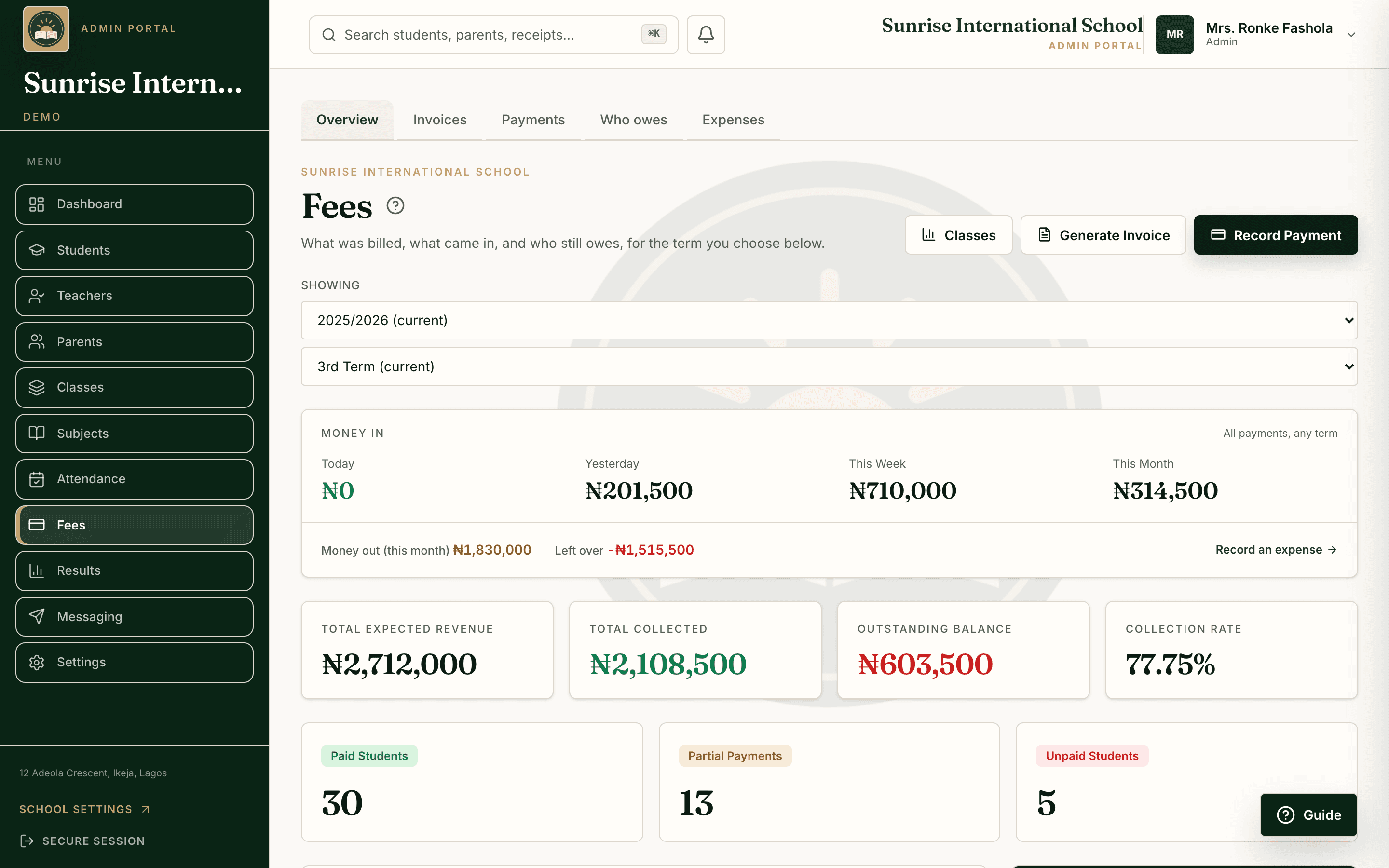
Admin office
Fees, attendance, results and receipts on one dashboard.
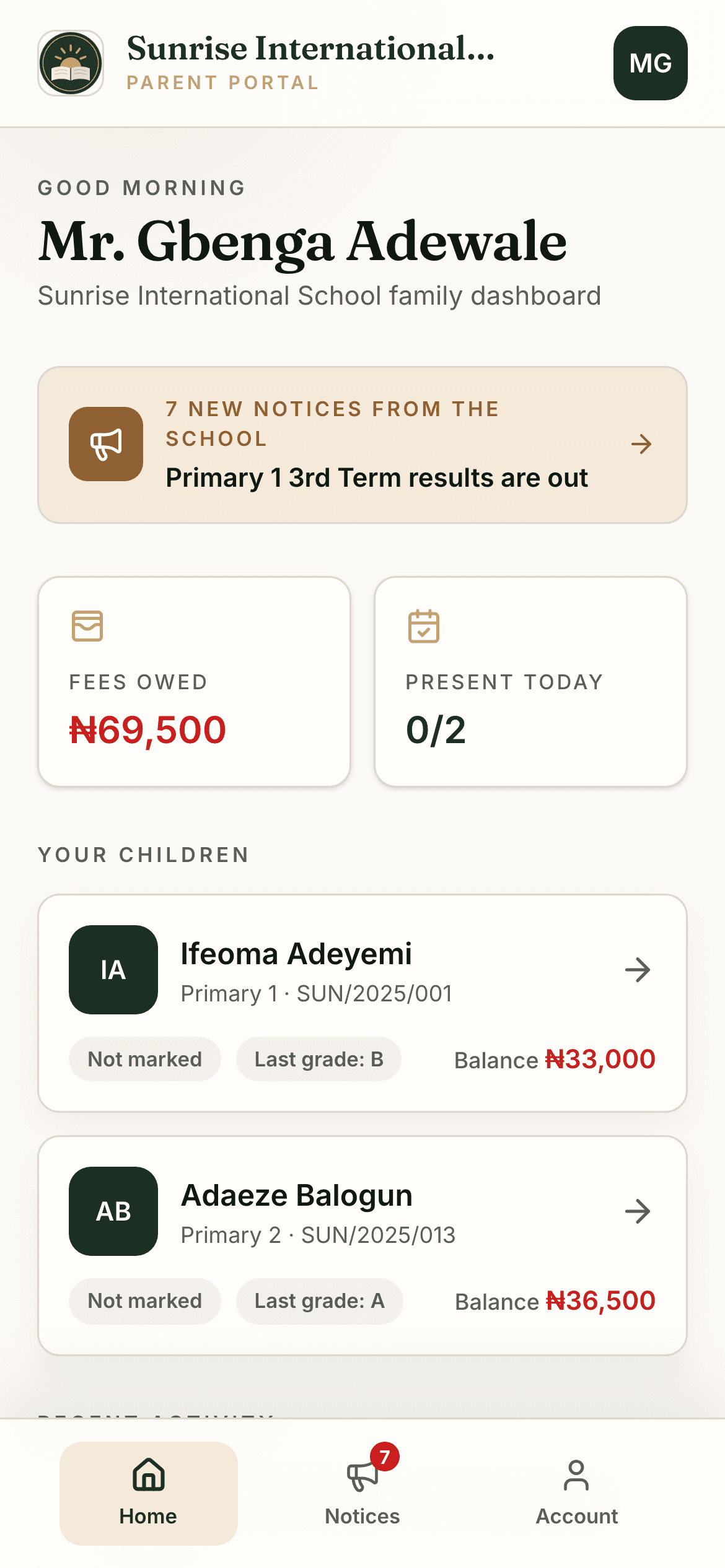
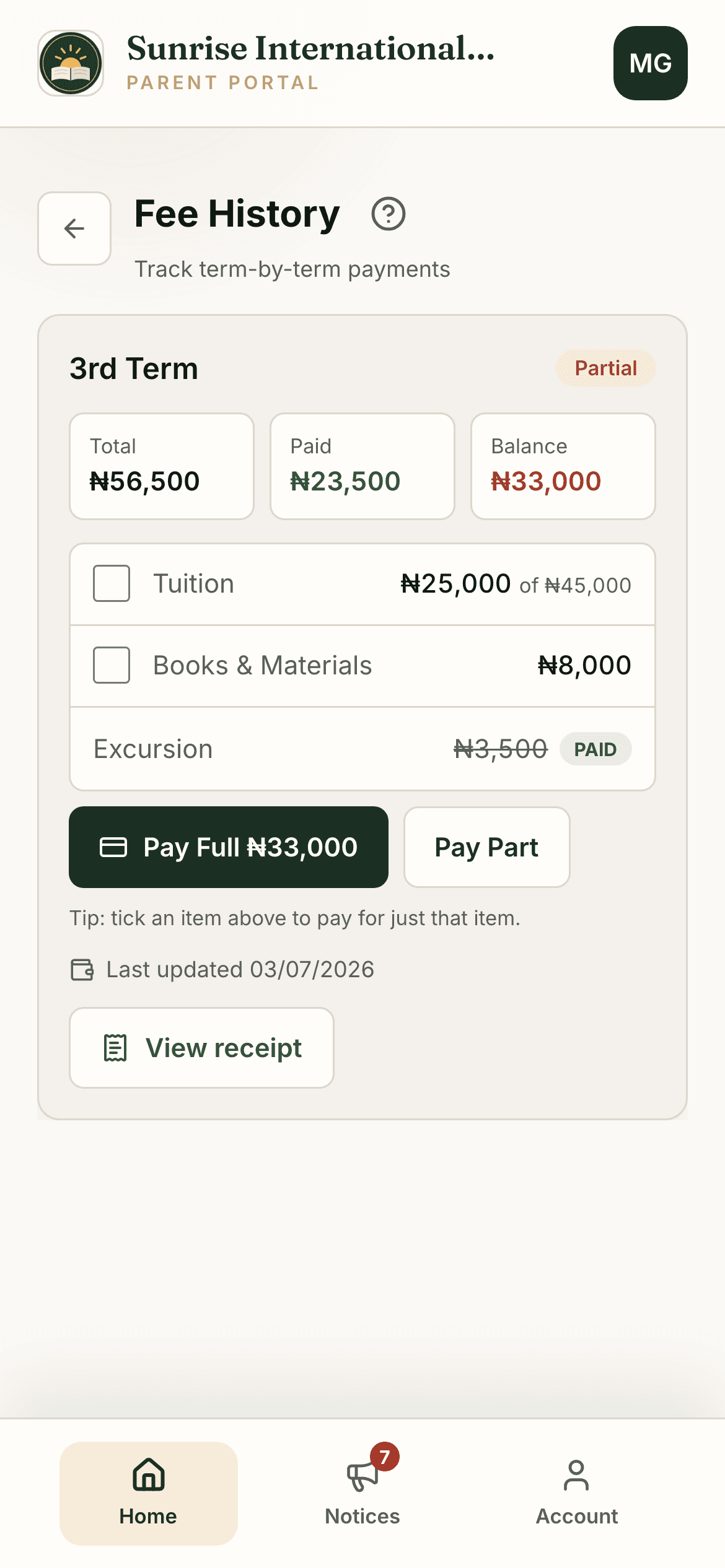
Parent portal
Balances, receipts, attendance and reports, under your school's name.
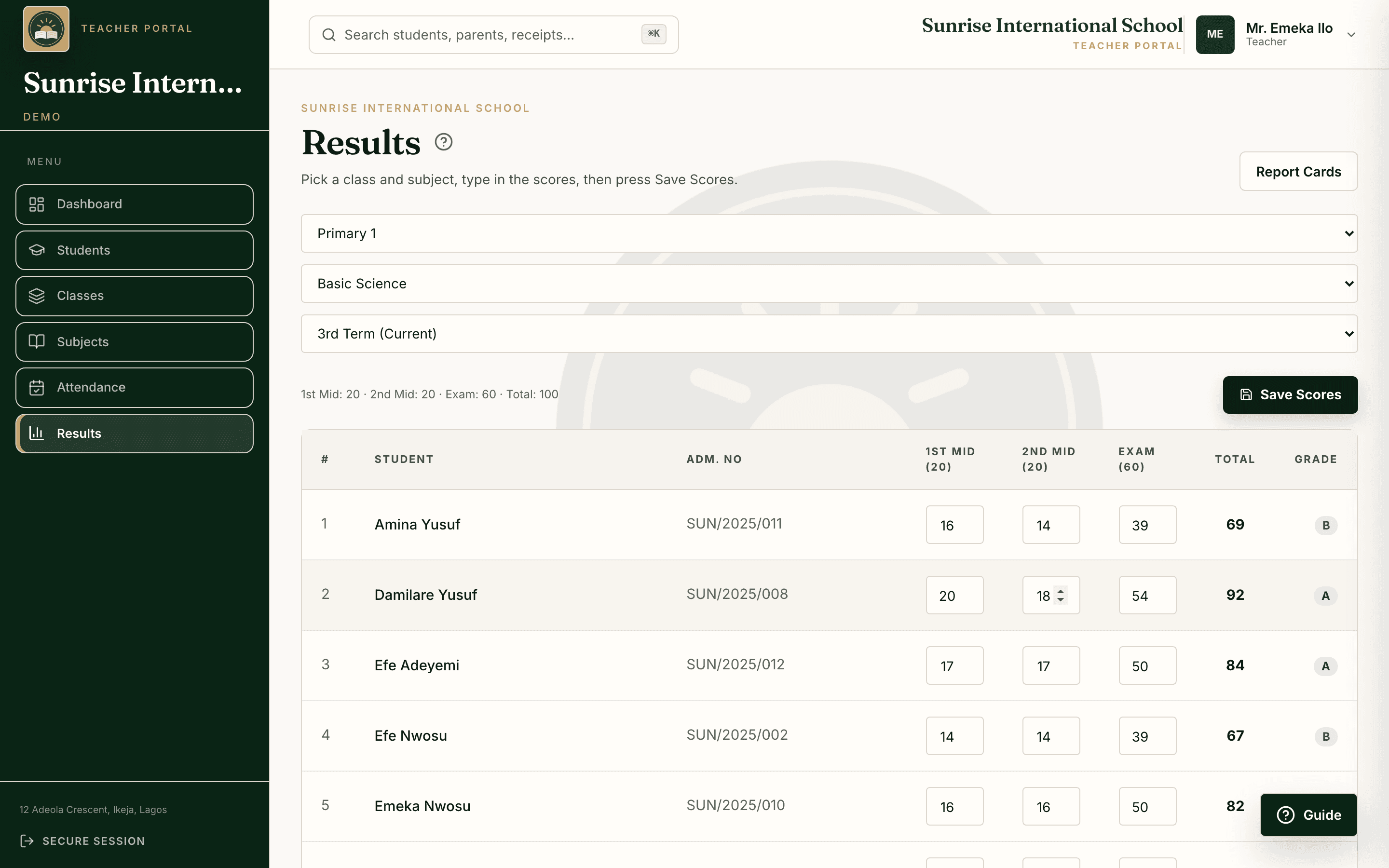
Teacher portal
Today's timetable, then straight into the register or the scores.
What schools get
Every plan includes the core SchoolNest modules. Here is the complete register, written out clearly.
Per-class fee structures, part payments, receipts, and a live defaulters list.
Compiled from teachers' scores behind an approval gate, printed under your crest.
Classes, guardians, history, and ID cards with photos and QR codes.
Registers that mark themselves the moment a child is scanned in.
Build each class week once, prevent clashes, and give every teacher the right subjects.
Device alerts, optional SMS reminders, and school notices under your own name.
Parents pay from their phone; the money lands in your school's own account.
Salaries, payslips, and a record of every month, kept beside the school's money.
Getting started
Send whatever you already have, a spreadsheet or photographs of the register, and a person does the rest: classes built, fees set, every login created, your team trained. Not a support ticket. Me.
No lock-in
Export your records to Excel whenever you like, with no exit fee. A school should never be trapped by the people it pays.

SchoolNest
WhatsApp · founder-led onboarding
Monday
Good morning. I want to move my school to SchoolNest. We have about 340 students.
9:04 AM
Welcome. Send your student list, an Excel sheet or even photos of the register, plus your fee amounts per class. We handle everything else.
9:06 AM
9:41 AM
All 340 students are in. Classes built, fees set, staff logins ready. Can we train your team at 4:00 PM today?
2:15 PM
Tuesday
You are live, under your school's own name. The first parent checked a result this morning.
8:02 AM
Pricing
Pay per term, the way your school already budgets. Your active student count sets one predictable price, and every plan includes all available core modules and hands-on setup.
Up to 150 students
₦75,000/term
or ₦200,000/year · save ₦25,000
One fixed price for the term. Enrolment is reviewed only at renewal.
All available core modules for smaller schools.
151 to 500 students
₦150,000/term
or ₦400,000/year · save ₦50,000
One fixed price for the term. Enrolment is reviewed only at renewal.
All available core modules, sized for growing schools.
501 to 1,000 students
₦250,000/term
or ₦675,000/year · save ₦75,000
One fixed price for the term. Enrolment is reviewed only at renewal.
All available core modules for larger and multi-stream schools.
Every plan includes all available core modules. We import your students, configure your terms and fees, create every login, and train your team. Standard remote setup is included. The AI help is included too, with a monthly limit sized for a whole school's lesson notes, report cards and scanning; if you ever reach it, everything else carries on as normal. SMS wallet charges, payment-provider fees, exceptional data cleanup, and on-site travel are separate. Above 1,000 students or operating multiple campuses? Message us on WhatsApp for a written custom plan.
The first five
Five schools, onboarded by me personally, on terms later schools will not get.
Four of five places still open. When they are taken, the program closes.
The five places
 Standard Schools, IlorinFounding school 1
Setup done for you
Students, classes, fees, training. Free.
30 days to evaluate
In your real school, before you pay.
First paid term half price
Off the published price for your band.
12 months of price certainty
Your renewal rate does not move.
Closer founder support
You work directly with me.
Named as a founding school
With your permission.
The 50% benefit applies once, to the first paid term after the evaluation, and cannot be combined with another discount. The agreed renewal rate is recorded in writing.

A note from the founder
“A proprietor should not need three notebooks to know what has been paid. A teacher should not lose an evening to results. A parent should not have to ring the school to know their child arrived.
I built SchoolNest for those three afternoons, and I still set up every school myself.”
Abdulsalam Abubakar
Founder, SchoolNest
Questions
Straight answers before you book a demo.
Yes. Every school's data is isolated and encrypted, access is strictly role-based, and you can export or delete your data at any time. Your records belong to you. We never sell or share them.
You can take your core school records with you. Every plan can export students, fees, payments, and results to Excel at any time, without asking us first. Your records belong to your school, not to us, and if you ask us to delete them, we do.
We do it for you. We import your students and classes, set up your terms and fees, create staff and parent logins, and train your team. Standard setup is usually completed within one working day after we receive your complete records. No technical work is required on your side.
Yes. Online payments go straight into your school's own account, and every payment is tracked automatically. You can still record cash, POS, and bank transfers too.
No. SchoolNest works in a modern browser on a phone, tablet, or computer. No app-store download is required, and staff and parents can add it to their home screen for an app-like experience.
Pricing is based on your active student count. See the plans above. Every plan includes all available core modules, unlimited staff and parent accounts, and hands-on setup. The AI help is part of that, with a monthly limit sized for a whole school's lesson notes, report cards and scanning. If your enrolment moves slightly past your plan's limit, we do not raise your price immediately. Your plan only steps up once your school has clearly grown.
Your data is isolated, encrypted, and yours to export or delete anytime.

SchoolNest
Send one WhatsApp message today. We will set up your school under its own name, then give your team 30 days to evaluate SchoolNest.
Or call +234 906 532 8108